

Leaderboard
-


sdlTBfanUK
Moderators2Points2346Posts -

ShrimpNewb
Members1Points64Posts
Popular Content
Showing content with the highest reputation on 02/27/19 in all areas
-
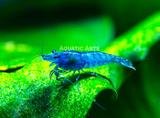
Here are the shrimp I just ordered from Aquatic Arts. They call them "Dream Blue Velvet." Very excited. First 10 shrimp, ever...
 1 point
 -
I understand why you would be extra sensitive/worried with your previous experience with these shrimps! They look fine to me and sometimes they do have red on the very front from what I can see (unless I am not looking at the right thing?), have a look at the ones here and see if that looks similar (these are a premium supplier so would not put photos of sick shrimp on their site): http://www.rendo-shrimp.de/epages/62701010.sf/en_GB/?ObjectPath=/Shops/62701010/Categories/Garnelen/Caridina/Red_Bee_Garnelen I also did a quick google search and some of those had red bits on the very front. They look very nice and quite a high grade, you are good at getting clear photos. Hopefully you will get some nice shrimplets from them. Simon1 point