Leaderboard
-


NoGi
HOF Member1Points5858Posts -

The Tech Den
Members1Points241Posts -

ageofaquariums
Members1Points178Posts
Popular Content
Showing content with the highest reputation on 08/20/16 in all areas
-
1 point
-
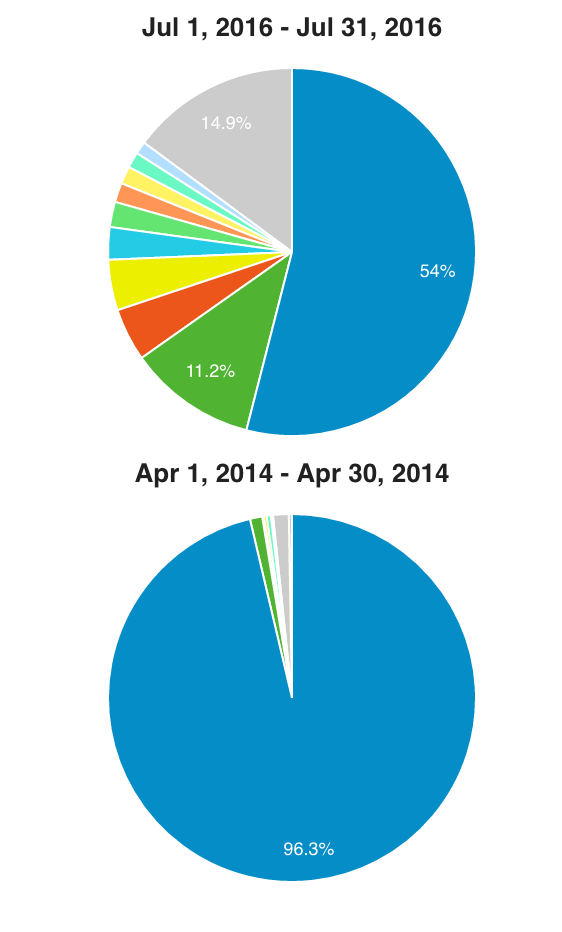
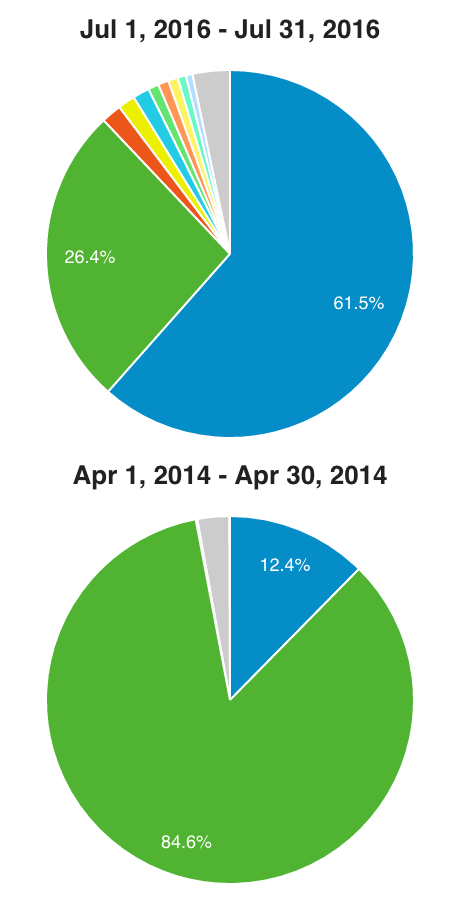
1 point@Finley, can you do me a favour and post the feedback in this thread: It will prompt me when I look at the rebranding. Also, for everyone else, I'll give some additional context to my previous posts which will hopefully dispel some of the current myths around us being Oz only and people not coming here via google because of the URL. These charts are comparing from the month I took over to last month. 2yrs ago, yes we were mostly an australian based forum with 96.3% of members being based in Oz (the blue chunk). Today, it's a very different picture and we are indeed a more global site. Yes we still make up the largest chunk of users but collectively not by much. When I took over, the name was what brought members to SKF as it was a closed forum, no google indexing, zero access to guests and overly complicated registration process. The green represents direct access via name, the blue is via a search engine, the others are a mix of other platforms. As you can see, in addition to opening up the forum and doing a whole range of things in the backend, the majority of people are still coming here via a google search because most of those search results are on the first page of results. What our name is doesn't impact where it ends up in the results list as much as all the other SEO related things I do. I have a ton of analytics that I have used to get to this point with the rebranding but that info is not really for public consumption as our competitors could use it to get an edge on us.
 1 point