

Leaderboard
-

jayc
Moderators1Points6248Posts -

JLRiggs73110
New Member1Points1Posts
Popular Content
Showing content with the highest reputation on 01/23/23 in Posts
-
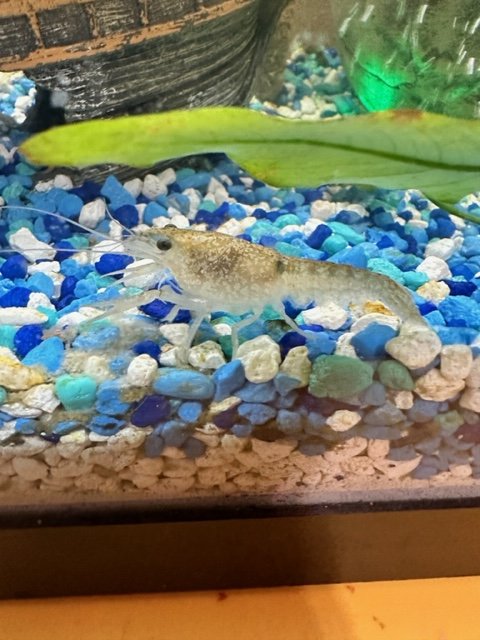
Hey all! First of all, thanks for the add! I really appreciate it! I hope I am not breaking any rules by posting this in this thread, so if I am, please relocate this post to where it belongs!! So, about a week or so ago I got a blue crayfish from the local pet store, and they told me that this "Little Dude" (His name!) was sent along with that shipment in error and it wasn't identified, or at least the pet store didn't know what it was, or told me it was another type of crayfish. After his first molt (Just last night and the fastest to complete one yet) he is a different color, slightly bigger, and I don't think he is a crayfish at all. I am thinking he is a shrimp, but I am not sure. If someone could confirm this for me, and possibly even identify what species of shrimp it is, that would be amazing!! Please don't judge the dirty tank I have been working and then he molted so I haven't had a chance to clean it properly in a little bit. I appreciate the help!
 1 point
 -
Welcome to SKFA. It's a Macrobrachium of some sort. Those claws give it away. But don't know which exact species of Macrobrachium. Might be able to narrow it down to which species if we knew where the shipment was from. Where are you from? Don't put this fella in a tank with other Neo Caridina or Caridina or Taiwan bee shrimps. It will eat those smaller shrimp.1 point