

Leaderboard
-

smicko
Members3Points849Posts -

newbreed
Members3Points3152Posts -
fishmosy
Members2Points4594Posts -

OzShrimp
Members2Points4102Posts
Popular Content
Showing content with the highest reputation on 07/29/14 in Posts
-
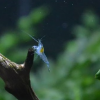 Here we go newbreed! I am entirely too lazy to take new pictures but these are my setups (hopefully the image size doesn't break the thread): The only shrimp I have at the moment are 3 red cherries. Tropical Community Natives Shrimp tank (the plants aren't nearly as yellow looking in person)1 point
 -
1 pointThe 2nd last pic looks like shadow panda??? Awesome Jen!! Very exciting times!1 point
-
 1 point
 -
1 point
-
 1 point
 -
1 point
-
 1 point
 -
1 point